Pinduoduo China Delivery Address: The Form, Translated
· AngkatPH
Even with Pinduoduo set to English, the form for a China address is all Chinese. This guide translates every field and button on it, tells you what to put in each one, and shows you how to pick the region, so your orders land at our China warehouse under your client code.
Copy, don't type. Our addresses are listed below, field by field. The same values are in Angkat Express → Warehouses → China Pinduoduo APP, where every field has its own Copy button with your client code already filled in.
Before you start
- The Pinduoduo app (拼多多), signed in. New to it? Read how to buy from Pinduoduo in the Philippines first.
- A free Angkat Express account, for your client code and warehouse details.
- Your shipping mode, because it decides which address you add:
- Sea freight: any of our China sea warehouses: Yiwu, Guangzhou or Shishi.
- Air freight: our Guangdong air warehouse.
You can save both a sea and an air address in Pinduoduo and choose between them on each order.
Step 1: Tap “Add delivery address in China”
Open Shipping Address (收货地址) in Pinduoduo. You can also get there from checkout by tapping the address at the top of the order. You'll see two buttons:
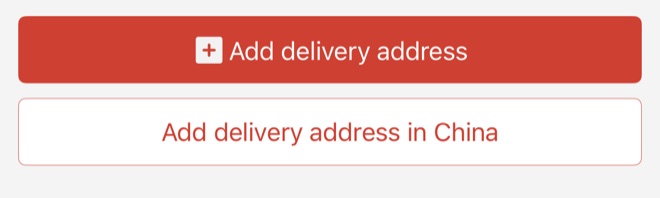
- Add delivery address in China (white button): use this one. It opens the Chinese form for a China address, which is where our warehouse is.
- Add delivery address (red button): for an overseas address. Pinduoduo then ships to you directly, and Angkat isn't involved.
Step 2: The form, field by field
The form is titled 添加收货地址, “Add delivery address”.
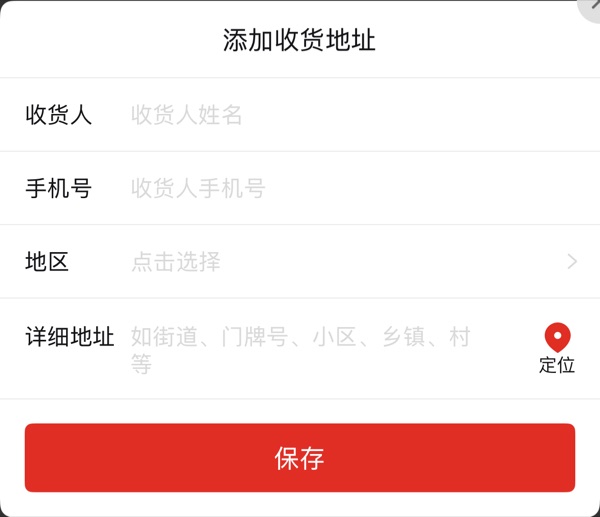
| Chinese | English | What to enter |
|---|---|---|
| 收货人 收货人姓名 | Recipient recipient's name | Sea: your client code, e.g. AKPH-XXXX. Air: the warehouse consignee name, then your client code. Copy it from your account. |
| 手机号 收货人手机号 | Mobile number recipient's mobile | The warehouse's 11-digit Chinese mobile number from your account. A Philippine number won't be accepted. |
| 地区 点击选择 | Region tap to select | Province, city, district and sometimes town. You tap these from a list rather than typing. See Step 3. |
| 详细地址 如街道、门牌号、小区、乡镇、村等 | Detailed address e.g. street, building number, compound, town, village | The street address from your account. It ends with your client code and our PH number in brackets, e.g. (AKPH-XXXX / +63 917 505 3696). |
| 定位 | Locate (use my location) | Don't tap it. It fills in wherever your phone is right now. |
| 保存 | Save | Tap once all four fields are filled. |
Your client code goes in twice: in 收货人 (recipient) and at the end of 详细地址 (detailed address), together with our PH number. That way both print on the seller's shipping label. Parcels without a client code are refused at our warehouse and go back to the seller.
Our Pinduoduo addresses, field by field
These are the same values shown under Warehouses → China Pinduoduo APP in your account. Replace AKPH-XXXX with your own client code, or copy from your account where it's already filled in.
Yiwu (义乌): Sea Freight
| 收货人 Recipient | AKPH-XXXX |
|---|---|
| 手机号 Mobile | 13867932099 |
| 地区 Region | 浙江省 › 金华市 › 义乌市 › 苏溪镇 Zhejiang › Jinhua › Yiwu › Suxi Town. Tap each level in the picker. |
| 详细地址 Detailed address | 苏溪镇好派路121号飞天制衣1楼通达仓库(AKPH-XXXX / +63 917 505 3696) |
Guangzhou (广州): Sea Freight
| 收货人 Recipient | AKPH-XXXX |
|---|---|
| 手机号 Mobile | 13924091288 |
| 地区 Region | 广东省 › 广州市 › 白云区 › 江高镇 Guangdong › Guangzhou › Baiyun › Jianggao Town. Tap each level in the picker. |
| 详细地址 Detailed address | 江高镇沙溪东路18号166 通达仓库(AKPH-XXXX / +63 917 505 3696) |
Shishi (石狮): Sea Freight
| 收货人 Recipient | AKPH-XXXX |
|---|---|
| 手机号 Mobile | 13600719368 |
| 地区 Region | 福建省 › 泉州市 › 晋江市 › 龙湖镇 Fujian › Quanzhou › Jinjiang › Longhu Town. Tap each level in the picker. |
| 详细地址 Detailed address | 龙湖镇梧坑村逸海工业园4栋A1 通达仓库(AKPH-XXXX / +63 917 505 3696) |
Guangdong Air (深圳): Air Freight
| 收货人 Recipient | 春艳 AKPH-XXXX |
|---|---|
| 手机号 Mobile | 18782939211 |
| 地区 Region | 广东省 › 深圳市 › 宝安区 › 航城街道 Guangdong › Shenzhen › Bao'an › Hangcheng Subdistrict. Tap each level in the picker. |
| 详细地址 Detailed address | 航城街道黄田甲田岗工业区18栋1楼18-4号(AKPH-XXXX / +63 917 505 3696) |
Step 3: Pick the region (地区)
Tap 点击选择 (“tap to select”). A list opens with 请选择 (“please select”) at the top and every province in China below it. Tap the province, and the list changes to cities. Tap the city, then the district, then the town if it asks for one.
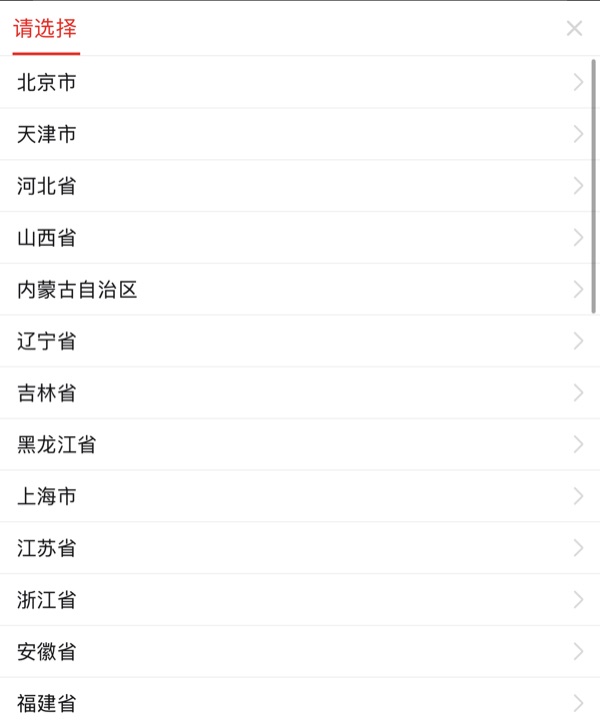
The province is the hardest part, because the list is in Chinese and isn't alphabetical. Here's where to find ours:
| Warehouse | Province (省) | Where it is in the list | City (市) |
|---|---|---|---|
| Yiwu (sea) | 浙江省 Zhejiang | 11th, right after 江苏省 | 金华市 Jinhua. Yiwu is listed under Jinhua. |
| Shishi (sea) | 福建省 Fujian | 13th, two below 浙江省 | 泉州市 Quanzhou |
| Guangzhou (sea) | 广东省 Guangdong | 19th; scroll down past 湖南省 | 广州市 Guangzhou |
| Guangdong (air) | 广东省 Guangdong | 19th; scroll down past 湖南省 | 深圳市 Shenzhen |
The full path for each warehouse, down to the district and town, is in the address list above and in your account, in the same Chinese characters as the picker. Match them character by character.
Step 4: Paste the detailed address (详细地址)
Copy the detailed address from your account and paste it in. Keep it in Chinese exactly as shown: don't translate it, shorten it, or remove the client code and PH number at the end. Then tap 保存 (Save).
Step 5: Check the address on every order
Pinduoduo pre-selects your default or last-used address. If you have also saved a Philippine address, it may still be the one selected. Before you pay, look at the address at the top of the order:
- It should be the China address you just added, not a Philippine one. Tap it to switch if needed.
- The recipient name should show your client code.
- For an air order, it should be the air address; for a sea order, a sea address.
Glossary: Chinese words on the address screens
| Chinese | English |
|---|---|
| 收货地址 | Shipping / delivery address |
| 添加收货地址 | Add delivery address |
| 收货人 | Recipient |
| 姓名 | Name |
| 手机号 | Mobile number |
| 地区 | Region |
| 点击选择 | Tap to select |
| 请选择 | Please select |
| 省 / 市 / 区 / 县 | Province / City / District / County |
| 镇 / 街道 | Town / Subdistrict |
| 详细地址 | Detailed address |
| 定位 | Locate (use current location) |
| 保存 | Save |
| 默认 / 设为默认 | Default / Set as default |
| 编辑 / 删除 | Edit / Delete |
| 确认收货 | Confirm receipt. Don't tap it until your Angkat account shows the parcel arrived. |
Common mistakes
- Using the red “Add delivery address” button. That's the overseas option, and the order won't come to us.
- Leaving out the client code, or typing it with a typo. The parcel is refused and goes back to the seller.
- Entering your Philippine mobile number. The form only takes an 11-digit Chinese mobile number.
- Tapping 定位 (Locate), which overwrites the region with where your phone is.
- Paying with the wrong address selected: a Philippine address, or the sea address on an air order.
Frequently asked questions
Which button do I use to add my Angkat address on Pinduoduo?
Add delivery address in China. The other button, Add delivery address, is for overseas addresses: Pinduoduo then ships to you directly and Angkat isn't involved.
What do I put in 收货人 (recipient) on Pinduoduo?
Copy it from your Angkat Express account. For sea freight it is your client code. For air freight it is the warehouse consignee name followed by your client code.
Why won't Pinduoduo accept my phone number?
The 手机号 field only accepts an 11-digit Chinese mobile number. Use the warehouse mobile number shown in your Angkat Express account, not your Philippine number.
Which Angkat warehouse do I use for Pinduoduo orders?
For sea freight, any of our China sea warehouses: Yiwu, Guangzhou or Shishi. For air freight, our Guangdong air warehouse. All of them are listed under Warehouses → China Pinduoduo APP in your Angkat Express account.
Related reading
- How to buy from Pinduoduo in the Philippines
- Shipping from Pinduoduo to the Philippines
- Pinduoduo refund guide for Filipino buyers
- Prohibited items list
Get your Pinduoduo address
Log in to Angkat Express, open Warehouses → China Pinduoduo APP, and copy each field straight into Pinduoduo.
Open my Pinduoduo address →No account yet? Create one free or message us.